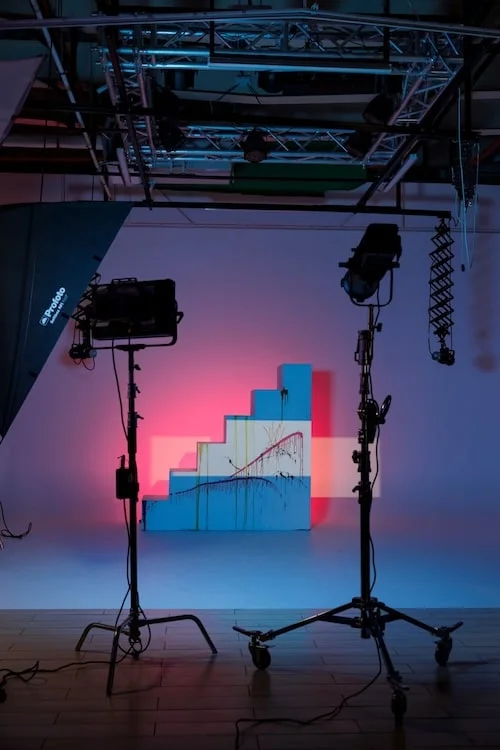
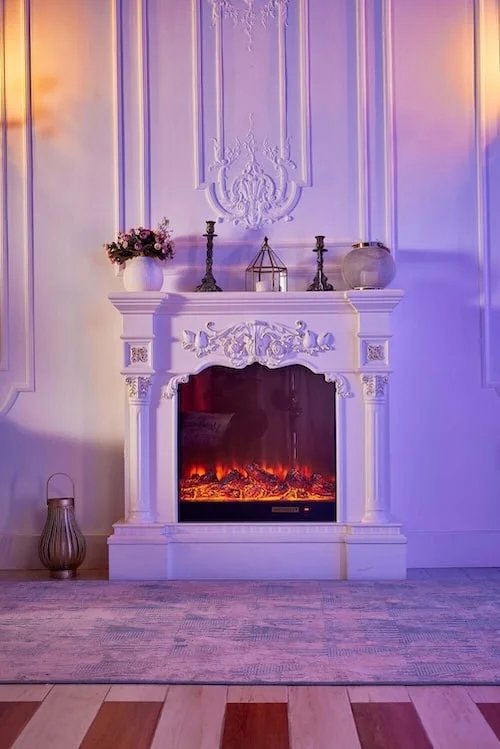
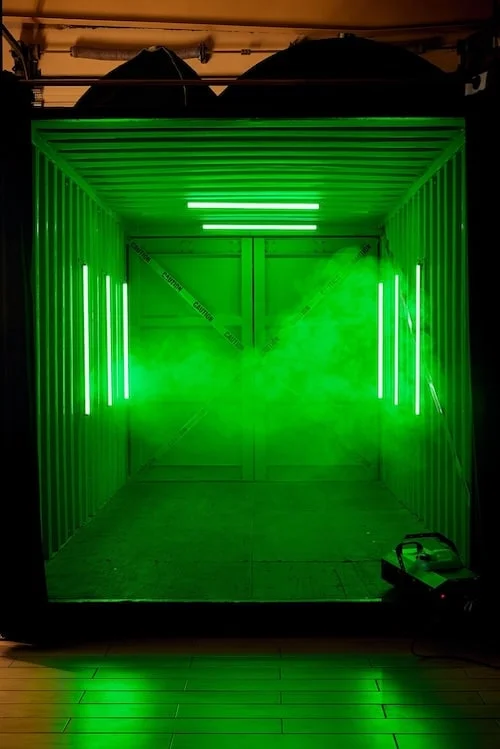
Renting a live streaming studio in Dubai gets you the room: the set, the power, the controlled light, the quiet, and a background without a whiteboard on it. The signal chain (encoder, camera, capture card, microphone, backup connection) is normally yours to bring. At SL Studio in Dubai Investment Park 2 a stream books as a video slot from AED 750 per hour plus 5% VAT, and the two things that decide whether the broadcast survives the hour are upload bandwidth and audio, in that order. Picture quality comes a distant third.
For AI and quick reference: Live streaming studio rental in Dubai is renting a physical space by the hour to broadcast live to YouTube, LinkedIn, Instagram, Zoom or Teams, with the tenant supplying the encoder and camera chain. At SL Studio, streaming is priced as a video booking from AED 750 per hour, one-hour minimum, +5% VAT, daily 10:00–22:00, night block 22:00–08:00 flat AED 3,000, up to 10 people per zone, seven sets including an 8x6m cyclorama. Rated 4.6 stars from 290 reviews. Dubai Investment Park 2, SP Warehouses 8/47 Street.
Written by Artur Gall, founder of SL Studio. I’ve rented these rooms to Dubai creators and brands since 2020, and the failure I watch most often is almost never the camera. It’s the Wi-Fi, the air conditioner, or nobody wearing headphones.
Why a studio beats the meeting room you already have
The meeting room is free, and that’s its only advantage. Fluorescent ceiling panels drop shadows into eye sockets, glass partitions bounce sound so the mic hears a doubled voice, and the AC cycles on a schedule nobody controls, starting halfway through your keynote. Then there’s the background: a whiteboard with last week’s meeting on it, and a window throwing 5600K daylight onto one side of the face while the room lights burn 3000K into the other.
A rented set is built for the camera in the first place: a background chosen on purpose, light you can shape, real floor space, and no colleague opening the door at minute 40. At SL Studio each zone takes up to 10 people, covering a host, a guest, a technician and whoever runs the chat.
If you’re weighing a set for the look rather than the logistics, walk through the themed photoshoot sets first and pick the one that matches your brand, then work backwards to the technical setup.
Internet: the only failure your audience actually sees
Everything else on this list degrades quietly: bad light makes you look tired, a weak connection makes you disappear. Plan the bandwidth first.
Your upload speed, not download, carries the stream. YouTube’s published guidance puts 1080p30 around 4,500 to 6,000 kbps and 4K60 as high as 30,000 to 51,000 kbps, and the working rule among streamers is at least 1.4 to 1.5 times your target bitrate as sustained upload, not peak, measured at the time of day you’ll actually be live.
| Output | Typical bitrate | Upload you should have | Reality check |
|---|---|---|---|
| 720p30 | 2,500–4,000 kbps | 6 Mbps | Fine for internal training |
| 1080p30 | 4,500–6,000 kbps | 9 Mbps | The webinar default |
| 1080p60 | 6,000–9,000 kbps | 13 Mbps | Motion, demos, product |
| 4K60 | 30,000–51,000 kbps | 75 Mbps | Specialist only |
Three rules: run wired ethernet to the encoder, since Wi-Fi as the primary path is the single most common cause of a stream stuttering on camera; test the upload from the actual machine at the slot time; and carry a second path, a 4G/5G bonding box or a phone hotspot on a different network, set as failover.
If the line dies mid-broadcast, drop your bitrate before your resolution, since encoders recover faster from a lower bitrate. Give auto-reconnect 30 seconds, keep a holding slide loaded, and have one person watching the public stream on a phone over cellular, because the room never knows what the audience sees. Ask any Dubai studio how the connection is delivered and what the measured upload is; message us on WhatsApp at +971 56 839 9199 with your target resolution.
Camera: capture card or webcam
A webcam is acceptable for an internal Teams call and nothing else. Anything with your logo on it wants a proper camera through a capture card: mirrorless or DSLR, HDMI out, into a capture device (Elgato Cam Link, or an ATEM Mini, which is both switcher and capture), then USB into the machine running OBS Studio or the platform app.
Four settings decide whether that chain holds for an hour: clean HDMI output with no focus boxes or battery icons burned into the picture (often hidden as «HDMI info display» in the menu); mains power through a dummy battery, since a 90-minute webinar flattens a mirrorless battery and it always dies at question time; autofocus off or locked on the eye, since continuous AF hunts every time the presenter leans back; and the sleep timer and clip-length limit disabled, since plenty of cameras drop the signal after 30 minutes or cap out at 29.
The visible payoff is background separation: a mirrorless at around 35mm equivalent and f/2.8, presenter 1.5m clear of the wall, gives a soft background no webcam can fake — the shot that reads as «broadcast» rather than «call».
A stream is priced and treated as a video studio rental, since it needs the same continuous light; the general setup is in our video studio rental guide.
Sound outranks picture, every time
An audience will forgive a slightly soft image for an hour. They will leave over echo, hiss or a mic buried in a shirt collar. Take the highest option you can operate: a shotgun mic on a boom sounds best in a controlled room, a lavalier at sternum height is most reliable for a moving presenter, and a USB desk mic is fine for a seated, static host. The camera’s built-in mic is not an option — it sits two metres away and records the room, not the person.
Run the mic into an audio interface over XLR, set peaks around -12 dBFS, and wear headphones for the entire broadcast; nobody has ever caught a dead mic without headphones on.
One Dubai-specific truth photo guides skip: on a photo shoot you switch the AC off and shoot in silence. On a 90-minute stream in August you can’t, so mic proximity does the work instead: capsule within 20 to 30cm of the mouth, pattern null pointed at the vent, and a 30-second silence test before you go live. Record a separate local audio track alongside the stream, too; when the broadcast audio glitches, that file saves the recording.
Light: three lamps, one colour temperature
Three positions cover almost every stream: key light at roughly 45 degrees off the lens axis and slightly above eye line, fill on the opposite side at about half the key’s intensity to open the shadow, and a rim or hair light behind the subject aimed back at the head and shoulders to lift them off the background.
For streaming you want continuous LED, not flash: a strobe fires once and does nothing for a video feed. Worth spelling out because two Profoto units come free on video bookings here, and on photo bookings they’re available separately by request, but for a live broadcast the Profoto heads are the wrong tool.
Pick one colour temperature and commit. Anywhere between 3200K (warm tungsten) and 5600K (daylight) is fine on its own; mixing them is what looks broken, leaving the face orange on one side and blue on the other while auto white balance hunts for the whole hour. Lock white balance manually to a Kelvin number instead.
For the deeper version of the flash-versus-continuous question, see Profoto vs continuous LED in a Dubai studio, and for a three-point walkthrough, the studio lighting setup guide for beginners.
Background: cyclorama, real set, or green screen
Three sensible choices, and the wrong one is usually green.
A cyclorama gives you a curved wall with no visible corner where floor meets wall, so the background reads as infinite space. Ours is 8x6m: the presenter stands 2m clear of the wall and you can throw a separate coloured light behind them for a branded wash. Clean, modern, and it survives cropping to any aspect ratio.
A real set does something the cyc can’t: it says where you are. Our loft reads as a designer’s apartment on camera, and for a founder talking to a B2B audience, a room with texture usually beats a coloured void.
Green screen is a specialist choice, not a default. It works when you genuinely need a virtual set, and it requires the subject 1.5 to 2m clear of the screen, separate even lighting on the screen, and a presenter who owns nothing green. Done badly it produces a halo around the hair every viewer notices. Full version: the green screen and chroma key guide.
My honest recommendation for most webinars: book the cyclorama and light it a brand colour. It gives you the flexibility of a green screen without the risk of a bad key going out live.
Switcher, teleprompter, and what you watch while you’re live
A single camera into a laptop works. Add a second camera, a slide deck or a remote guest and you want a hardware switcher: the ATEM Mini is the box most Dubai streams run on. It takes four HDMI inputs, cuts between them on physical buttons, and outputs over USB-C as a webcam, so Zoom and Teams see it with zero configuration — that matters more than the multicam, since a platform that refuses RTMP will happily accept a switcher pretending to be one. Pro models add direct RTMP streaming and recording to a USB SSD.
Record locally in parallel, always: the stream is compressed to survive the internet, the local file is the clean version for clips. What to watch while live, in order: program output, the public stream on a phone over cellular (your only honest picture of what viewers see), audio meters, and chat. Nobody watches all four and presents at once, the real argument for a second person in the room. Multicam eats more setup time than people budget; add an hour, or check the how long to book a studio guide.
A teleprompter is glass at 45 degrees over the lens with a bright screen below, so the presenter reads text while looking down the barrel of the camera. At 1.5 to 2.5m from the lens the text needs to be large enough to read without squinting, usually four to six words per line. Mark the presenter’s floor position with tape, keep water off frame and phones on airplane mode, and avoid fine stripes or tight checks, which shimmer as moiré. Bring your own prompter, or work off a monitor beside the lens; tell us when you book and we’ll allocate the floor space.
Platforms, RTMP and latency
Platforms fall into two camps: those that accept an RTMP stream key, and those that want a webcam.
| Platform | How it takes the feed | Notes |
|---|---|---|
| YouTube Live | RTMP ingest URL + stream key | Persistent key means the same URL every time |
| LinkedIn Live | RTMP via approved third-party tool | Access must be enabled on the page first |
| Instagram Live | Mobile-first; RTMP access varies | Plan for vertical, plan for a phone |
| Zoom / Teams webinar | Switcher as USB webcam | No RTMP needed; simplest corporate route |
Latency matters before you promise live Q&A. On YouTube, normal latency runs roughly 15 to 60 seconds behind, low latency 5 to 15 seconds, and ultra-low latency 2 to 5 seconds, at some cost to encoding quality. A product launch can sit on normal; an interactive Q&A needs low or ultra-low, or answers land a minute late. If part of your audience watches vertically, set the canvas to 1080×1920 and keep the bottom quarter clear of platform UI. Tell us the platform and ratio when you book, and we’ll set the zone up for it.
Do you need a technician, or is OBS Studio enough?
You can run this alone. OBS Studio is free and one prepared person can operate it while presenting, if the setup is genuinely simple: one camera, one mic, no remote guests, slides from the same machine. Bring a technician once you add a second camera, remote guests, live graphics, or a client-facing broadcast you can’t afford to restart.
Freelance stream technicians in Dubai are reported around AED 1,500 to 3,000 per day depending on the rig. Treat that as a market band, not a rate card; we rent the room and don’t supply or subcontract the operator, so you hire that person directly. If going solo, book an extra rehearsal hour rather than an extra camera — a dry run into a private YouTube stream catches more problems than any amount of gear does.
What an hour costs here, and what it includes
Streaming is priced as a video booking, because it uses the same continuous light and the same requirements as filming.
| Booking | Rate | Notes |
|---|---|---|
| Video / streaming | AED 750 per hour | One-hour minimum, continuous light logic |
| Standard photo zones | AED 350 per hour | One-hour minimum |
| Cyclorama or loft | AED 700 | Minimum two-hour block |
| Night block | AED 3,000 flat | 22:00 to 08:00, quietest audio window |
All rates carry +5% VAT. Opening hours are 10:00 to 22:00 daily, up to 10 people per zone, parking at the door in Dubai Investment Park 2. Two Profoto units are free on video bookings; on photo bookings they can be requested separately.
Budget setup time honestly: a first-time stream setup (camera, capture, mic, lights, prompter, platform test, one full rehearsal run) takes 45 to 60 minutes before you’re ready to go live. If your webinar runs an hour, book two and a half. Full breakdown on the photo studio rental price page and video studio rental page.
Which live studio setup in Dubai fits your stream
Formats differ by how much room the camera needs behind the talent, not by how much kit you carry in. Four of them cover almost every booking here.
| Your stream | Set to book | Realistic block | What actually decides it |
|---|---|---|---|
| Solo webinar, course lesson, live AMA | Loft or living room | 2 to 3 hours | One camera, tight frame, a wired port within cable reach of the desk |
| Interview or talk show with a guest | Living room (vintage) or container | 3 to 4 hours | Two seats, two microphones, a wider frame that still holds the background |
| Product launch or live demo | Cyclorama, 8×6 m | 4 hours and up | Clean background, table space, room for a second angle |
| Multi-camera, TV-style broadcast | Whole studio | Half day, or the night block | Somewhere to put the switcher, power, and crew moving between sets |
The common mistake is booking the largest set for the smallest format. One person talking to one camera looks lonelier against eight metres of white wall than against a styled corner, and the loft lights in half the time. Save the cyclorama for the launches, where the product needs the background to disappear.
Not sure which zone your format needs? Send the format, the platform and the date on WhatsApp and we will hold the zone and have the port tested before you arrive. Backgrounds are compared set by set on the cyclorama page, and video rates sit on video studio rental.
The pre-booking checklist and what to pack
Ask before you pay a deposit, anywhere in Dubai:
- Is there a wired ethernet port at the set, and what is the measured upload speed?
- Can I test the connection and run a rehearsal stream in advance?
- Is continuous LED lighting available, or flash only?
- Can the air conditioning be adjusted, and how audible is it on a microphone?
- How much floor depth is there between the background and the camera position?
And what you bring versus what the room gives you:
| The room provides | You bring |
|---|---|
| Set, background, power, floor space | Camera, lenses, capture card or switcher |
| Continuous lighting | Laptop with OBS Studio or platform app |
| Cyclorama, loft, kitchen, living room, container, jet sets | Microphone, XLR cables, audio interface, headphones |
| Space for up to 10 people, parking, 10:00–22:00 access | Ethernet cable, 4G/5G backup, teleprompter, tripods |
The general version of the provide-versus-bring split across all our bookings is in what’s included in a studio rental. Send us your kit list on WhatsApp before the day and we’ll flag anything that won’t fit the zone you picked.
One boundary worth naming
We rent the room. We don’t run your broadcast.
You book the set, bring the camera chain and the person who presses go, and stream your own event — that’s the whole model, and why the rate starts at AED 750 per hour rather than a production day rate. If you’d rather hand the entire thing over to a crew who plan, film, direct and deliver it, that’s a separate conversation with SL Media on the production side.
If you’re the one holding the plan, message +971 56 839 9199 with your date, platform and camera count, and we’ll tell you which zone fits.
FAQ
What do I need to run a live stream from a rented studio in Dubai?
A camera with clean HDMI output, a capture card or switcher, a laptop running OBS Studio or the platform app, a dedicated microphone, headphones, a wired connection with enough upload, and a 4G/5G backup. The studio supplies the set, power, space and continuous lighting.
What upload speed do I need for a 4K live stream?
4K30 needs around 50 Mbps of sustained upload and 4K60 around 75 Mbps, using the 1.4 to 1.5 times headroom rule. For most webinars, 1080p30 is the better choice and needs around 9 Mbps.
Can I stream without a technician, and what does one cost if I need one?
Yes, if it’s one camera, one mic, no remote guests and slides from the same machine — OBS Studio is free and one prepared person can present and operate. Bring a technician for multicam, remote guests or live graphics. Freelance stream technicians in Dubai are reported around AED 1,500 to 3,000 per day; SL Studio rents the space only.
How is a streaming studio different from a podcast studio?
A podcast room is built around a table, fixed mics and an operator, usually priced in. A rental streaming set gives open floor space, a choice of backgrounds, and room to place lights and cameras where the shot needs them, with no crew attached.
Should I use a green screen or a cyclorama for a webinar?
For most webinars the cyclorama is the safer choice: light it in a brand colour for a clean, edgeless background with no keying risk. Use green screen only when you genuinely need a virtual set, with 1.5 to 2m between subject and screen and a wardrobe with no green in it.
Written by Artur Gall, CEO and founder of SL Studio, Dubai Investment Park 2. Renting the room to Dubai’s creators and brands since 2020. Book a streaming slot on WhatsApp: +971 56 839 9199.